
BLOG on SharePoint in English: CLUB UGSF - SHAREPOINT FRENCH
8/03/2007
Microsoft SharePoint Products and Technologies Team Blog : Microsoft SQL Server 2005 SP2 Reporting Services integration with WSS 3.0 and MOSS 2007
SQL Server 2005 Service Pack 2 (SP2), which will be released any minute now :-), enables deep integration between Reporting Services and SharePoint technologies (Windows SharePoint Services 3.0 and Office SharePoint Server 2007). This integration enables an end-user to view and manage reports completely from within a SharePoint environment. The following is an excerpt from the upcoming 2007 Microsoft Office System Business Intelligence Integration with SQL Server 2005 whitepaper. [Update March 17: Added the hyperlink for the whitepaper, which is 1.5 MB in size and in Word 2007 .DOCX format. 48 pages] Microsoft SharePoint Products and Technologies Team Blog : Microsoft SQL Server 2005 SP2 Reporting Services integration with WSS 3.0 and MOSS 2007 (P. Erol GIRAUDY).


7/31/2007
Download details: SharePoint Server 2007 Document: Microsoft and EMC - Managing Content Across an Enterprise
The Enterprise Content Management platforms from Microsoft and Documentum EMC can be deployed in different ways to address a range of content management requirements within a digitally driven enterprise. Working together, Microsoft and Documentum EMC make it easy for their customers to develop a content ecosystem that enhances business value. This paper describes the options available to customers who want to take advantage of both Microsoft and Documentum EMC solutions. Download details: SharePoint Server 2007 Document: Microsoft and EMC - Managing Content Across an Enterprise
Microsoft SharePoint Products and Technologies Team Blog : Thank you for a banner year for SharePoint!
Thank you for a banner year for SharePoint!
Wow! What a fantastic year for SharePoint products and technologies! For those of you who haven’t seen the news yet, we just announced that SharePoint Server passed the US$800 million mark for revenue for Microsoft’s previous fiscal year (FY07) that ended on June 30th. In fact, SharePoint Server is the fastest growing server products in Microsoft’s history. Thank you, thank you, THANK YOU for your continued support, advocacy, and adoption of SharePoint.
With these great results, it's time for a little nostalgia and some looking ahead. I have personally been working on and off the SharePoint business since 1998 – anyone remember Tahoe? When we decided to start development on SharePoint Portal Server 2001, it was a big step forward for Microsoft. We were making a big bet that collaboration, portals, content management and enterprise search would become mainstream and gain the same kind of broad acceptance that personal productivity tools such as Microsoft Office had experienced. We were growing the Exchange Server business, Outlook had just released and was growing in popularity, and Windows NT 4.0 and SQL Server were growing in enterprise usage. SharePoint was the new kid on the block, and we thought we had a winner because we had listened closely to what customers and partners were telling us and tried to put SharePoint to work solving the business problems they described.
Fast forward 6 years to 2007 and 85 million user licenses later, SharePoint has exceeded our wildest expectations in terms of growth, and I hear from customers almost daily about how they’re taking advantage of the improvements in the latest versions of WSS, MOSS, and SharePoint Designer. Overall, we have over 200 MOSS 2007 case studies, but I'd like to highlight some of my favorite customer stories. Customers ranging from Del Monte to MTV to Mary Kay are running SharePoint to solve all different business problems -- click on the hyperlinks for the respective case studies. One area that has grown very fast for MOSS 2007 is moving from inside the firewall to being the platform and application of choice for customers’ extranets and Internet facing sites. My favorite ones are are Glu Mobile, Hawaiian Airlines, and Paul Mitchell. When I show these sites to other folks inside and outside of Microsoft, the first reaction is always “No way! This isn’t really a SharePoint site! It looks nothing like a team site or portal!” Exactly! And I’d expect to see many more public web sites deployed on MOSS 2007 in the next year.
While we have added hundreds of new features and even entirely new capability areas such as Records Management, e-forms, and line of business integration, we are still working towards the same SharePoint vision, which is making the optimization of business productivity based a common technology infrastructure a practical reality for all users within a corporate intranet, on an extranet, or on the Internet. In future versions, we will continue to work on achieving that vision by innovating across all the product capabilities.
Thanks for indulging me for a quick look back at SharePoint over the past several years. In closing, if you are an existing customer or partner, thank you very much for your continued support and usage of SharePoint. If you are a new customer or partner, thank you for getting started with SharePoint. We will work hard to make all of you enjoy every minute of your use of SharePoint and the business value you get from your SharePoint investments. Let’s keep the conversation going and continue to make SharePoint the product that you want to address your business productivity needs.
Here’s to a great FY08 and continued success to all of our customers and partners! I look forward to seeing many of you at the SharePoint Conference in Seattle on March 2-6, 2008!
Microsoft SharePoint Products and Technologies Team Blog : Thank you for a banner year for SharePoint!
Wow! What a fantastic year for SharePoint products and technologies! For those of you who haven’t seen the news yet, we just announced that SharePoint Server passed the US$800 million mark for revenue for Microsoft’s previous fiscal year (FY07) that ended on June 30th. In fact, SharePoint Server is the fastest growing server products in Microsoft’s history. Thank you, thank you, THANK YOU for your continued support, advocacy, and adoption of SharePoint.
With these great results, it's time for a little nostalgia and some looking ahead. I have personally been working on and off the SharePoint business since 1998 – anyone remember Tahoe? When we decided to start development on SharePoint Portal Server 2001, it was a big step forward for Microsoft. We were making a big bet that collaboration, portals, content management and enterprise search would become mainstream and gain the same kind of broad acceptance that personal productivity tools such as Microsoft Office had experienced. We were growing the Exchange Server business, Outlook had just released and was growing in popularity, and Windows NT 4.0 and SQL Server were growing in enterprise usage. SharePoint was the new kid on the block, and we thought we had a winner because we had listened closely to what customers and partners were telling us and tried to put SharePoint to work solving the business problems they described.
Fast forward 6 years to 2007 and 85 million user licenses later, SharePoint has exceeded our wildest expectations in terms of growth, and I hear from customers almost daily about how they’re taking advantage of the improvements in the latest versions of WSS, MOSS, and SharePoint Designer. Overall, we have over 200 MOSS 2007 case studies, but I'd like to highlight some of my favorite customer stories. Customers ranging from Del Monte to MTV to Mary Kay are running SharePoint to solve all different business problems -- click on the hyperlinks for the respective case studies. One area that has grown very fast for MOSS 2007 is moving from inside the firewall to being the platform and application of choice for customers’ extranets and Internet facing sites. My favorite ones are are Glu Mobile, Hawaiian Airlines, and Paul Mitchell. When I show these sites to other folks inside and outside of Microsoft, the first reaction is always “No way! This isn’t really a SharePoint site! It looks nothing like a team site or portal!” Exactly! And I’d expect to see many more public web sites deployed on MOSS 2007 in the next year.
While we have added hundreds of new features and even entirely new capability areas such as Records Management, e-forms, and line of business integration, we are still working towards the same SharePoint vision, which is making the optimization of business productivity based a common technology infrastructure a practical reality for all users within a corporate intranet, on an extranet, or on the Internet. In future versions, we will continue to work on achieving that vision by innovating across all the product capabilities.
Thanks for indulging me for a quick look back at SharePoint over the past several years. In closing, if you are an existing customer or partner, thank you very much for your continued support and usage of SharePoint. If you are a new customer or partner, thank you for getting started with SharePoint. We will work hard to make all of you enjoy every minute of your use of SharePoint and the business value you get from your SharePoint investments. Let’s keep the conversation going and continue to make SharePoint the product that you want to address your business productivity needs.
Here’s to a great FY08 and continued success to all of our customers and partners! I look forward to seeing many of you at the SharePoint Conference in Seattle on March 2-6, 2008!
Microsoft SharePoint Products and Technologies Team Blog : Thank you for a banner year for SharePoint!
7/30/2007
Business Data Catalog Read and Write? You got it! - Blog
OK so you've read all of this, and now you want to try it! Head over to the BDC Meta Man site then and download version 2.0.0.1 beta. The very final thing I want to let you know is that this functionality is currently available in the free Developer version of BDC Meta Man. It is likely however that in the next version it will be available for Professional users only! Business Data Catalog Read and Write? You got it! - Blog
7/28/2007
Download details: Microsoft Forefront Security for SharePoint with Service Pack 1
Microsoft Forefront Security for SharePoint integrates multiple scan engines from industry-leading vendors and content controls to help businesses protect their Microsoft SharePoint collaboration environments by eliminating documents containing malicious code, confidential information, and inappropriate content. Microsoft Forefront Security for SharePoint with Service Pack 1 manages and integrates industry-leading antivirus engines to provide comprehensive protection against the latest threats to help ensure documents are safe before they are saved to or retrieved from the SharePoint document library. In addition, documents can be scanned for company sensitive information, profanity or other administrator-defined content policies. Through deep integration with Office SharePoint 2007 and Windows SharePoint Services 3.0, Forefront Security for SharePoint helps protect your collaboration environment while maintaining uptime and optimizing performance. Forefront Security for SharePoint also enables administrators to easily manage product configuration, operation, automated antivirus signature updates and reporting at the server and enterprise level.Customers who purchase Forefront Security for SharePoint to protect Microsoft Office SharePoint Server 2007 or Microsoft Windows SharePoint Services version 3.0 will also be licensed to use Antigen for SharePoint to protect Microsoft SharePoint Portal Server 2003 and Microsoft Windows SharePoint Services 2.0 environments.
Download details: Microsoft Forefront Security for SharePoint with Service Pack 1
Download details: Microsoft Forefront Security for SharePoint with Service Pack 1
7/26/2007
SmartPart for SharePoint - Home
Great Web part : SmartPart for SharePoint The SharePoint web part which can host any ASP.NET web user control. Create your web parts without writing code!Resources by JanTielens, version 7 Introducing the SmartPart with ASP.NET AJAX Support - Small screencast of ASP.NET AJAX in action (a wonderfull démo - vidéo) - AJAX-style Web Part Connections - Small screencast of connectable web parts in action - Using the Control Toolkit in SharePoint
7/25/2007
Microsoft Webcast: Creating a Global Human Resources System Foundation with SharePoint Server 2007 (Level 100)
In this webcast, we describe how migration of the Microsoft Human Resources Web content platform to Microsoft Office SharePoint Server 2007 enables: Faster future development. Reduction of 50% custom code, resulting in business and IT agility. Lower sustenance costs. Essential capabilities for future state architecture. Alignment with the Microsoft IT global vision for simplification. In the past, each application or content site developed its own functionality and process, leading to more than 20 highly customized applications and/or sites today. Continuing down this path breeds redundant work and convoluted technical architecture. Join this webcast to learn how migrating the HR Web content platform to SharePoint Server 2007 is expected to provide a return on investment (ROI) of more than $10 million over three years and a reduction of 15 custom global HR Web sites.
Language(s): English. Product(s): SharePoint Portal Server.
Audience(s): Business Decision Maker. Duration: 60 Minutes
Start Date: Wednesday, August 15, 2007 11:00 AM Pacific Time (US & Canada)
Microsoft Webcast: Creating a Global Human Resources System Foundation with SharePoint Server 2007 (Level 100) EROL
Language(s): English. Product(s): SharePoint Portal Server.
Audience(s): Business Decision Maker. Duration: 60 Minutes
Start Date: Wednesday, August 15, 2007 11:00 AM Pacific Time (US & Canada)
Microsoft Webcast: Creating a Global Human Resources System Foundation with SharePoint Server 2007 (Level 100) EROL
KWizCom - Knowledge Worker Components, Web Part Solutions, WSS, MOSS, SharePoint - KWizCom.com
http://www.kwizcom.com/KWizCom_Newsletter_July_2007.pdf a nice letter on this products.
Products : SharePoint Offline Solution - ShareGo SharePoint Calendar Web Part - Calendar Plus SharePoint Survey Web Part - Survey Plus SharePoint Search String Highlighter CRM Connector to SharePoint WSS Cross Site Search SharePoint List Filter - Multiple Drop-Down Picture Library Plus Org. Chart Web Part Quick Launch Web Part SharePoint Go Offline for Office 2003 SharePoint List Menu Editor Office Reporting Services Add-In. KWizCom - Knowledge Worker Components, Web Part Solutions, WSS, MOSS, SharePoint - KWizCom.com
Products : SharePoint Offline Solution - ShareGo SharePoint Calendar Web Part - Calendar Plus SharePoint Survey Web Part - Survey Plus SharePoint Search String Highlighter CRM Connector to SharePoint WSS Cross Site Search SharePoint List Filter - Multiple Drop-Down Picture Library Plus Org. Chart Web Part Quick Launch Web Part SharePoint Go Offline for Office 2003 SharePoint List Menu Editor Office Reporting Services Add-In. KWizCom - Knowledge Worker Components, Web Part Solutions, WSS, MOSS, SharePoint - KWizCom.com
7/24/2007
Home - BDC Meta Man Blog
As an extension to the great tool that we provide, we have decided to add more functionality firstly in the format of a KPI BDC Web Part. Current using MOSS KPI's you can create a KPI on Excel Workbook data, List Data, SQL Server Analysis Data or Manually inputted KPI data. We thought that MOSS Power Users might actually want to base the KPI's on data retrieved by BDC. Home - BDC Meta Man Blog
Sharepoint Tips and Tricks : SharePoint Site Moves, Database Moves and Balancing Growth
Sharepoint Tips and Tricks : SharePoint Site Moves, Database Moves and Balancing Growth a great article by Cory Burns on (Site Moves are an important part of maintaining your SharePoint environment. )
7/20/2007
Deploy a SharePoint list template to SharePoint MySites - Ton Stegeman [MVP] weblog
Deploy a SharePoint list template to SharePoint MySites - Ton Stegeman [MVP] weblog 6 step by
The last step I took was to create a solution deployment package. This makes it much easier to install all bits to the server. There are multiple items about creating and installing such a package, so I won’t show this here. I hope this post helps you if you have a similar scenario. I also use this same mechanism to deploy site templates (STP). Otherwise I hope it helps you realize SharePoint features are very valuable and powerful. Published Jul 10 2007, 08:11 PM by tonstegeman
The last step I took was to create a solution deployment package. This makes it much easier to install all bits to the server. There are multiple items about creating and installing such a package, so I won’t show this here. I hope this post helps you if you have a similar scenario. I also use this same mechanism to deploy site templates (STP). Otherwise I hope it helps you realize SharePoint features are very valuable and powerful. Published Jul 10 2007, 08:11 PM by tonstegeman
7/17/2007
Download details: Case Study - Mary Kay, major cosmetics producer, deploys Microsoft Search Technology to increase efficiency
Mary Kay Inc, one of the largest direct selling skin care and color cosmetics companies in the world, was without a viable enterprise search application. After moving its US portal to Microsoft® SharePoint® Portal Server 2003, the company decided to upgrade to Microsoft Office SharePointer Server 2007 to leverage the content indexing and search platform functionality. The company now has robust, easy-to-use search functionality that will scale along with its global IT improvement and integration efforts.
7/15/2007
Download details: Streamlining Records Management Using SharePoint Server 2007 Workflow
The Microsoft Legal and Corporate Affairs (LCA) Records Management team is responsible for tracking the location and contents of some two million boxes of documents stored by Microsoft employees. The LCA Records Management team created an efficient tracking solution that provides employees with easy access to records information and offsets the need to handle all box inventory queries manually. Building on the power of Microsoft Office SharePoint 2007 and Office InfoPath 2007, the solution uses forms and workflows to automate the collection of inventory data. The solution increases accuracy, enforces business rules, and simplifies access to collected inventory information, helping the LCA team to scale easily and manage the growth and demand for document retention companywide.
7/14/2007
7/13/2007
Download details: Streamlining Records Management Using SharePoint Server 2007 Workflow
Download details: Streamlining Records Management Using SharePoint Server 2007 Workflow
The Microsoft Legal and Corporate Affairs (LCA) Records Management team is responsible for tracking the location and contents of some two million boxes of documents stored by Microsoft employees. The LCA Records Management team created an efficient tracking solution that provides employees with easy access to records information and offsets the need to handle all box inventory queries manually. Building on the power of Microsoft Office SharePoint 2007 and Office InfoPath 2007, the solution uses forms and workflows to automate the collection of inventory data. The solution increases accuracy, enforces business rules, and simplifies access to collected inventory information, helping the LCA team to scale easily and manage the growth and demand for document retention companywide.
The Microsoft Legal and Corporate Affairs (LCA) Records Management team is responsible for tracking the location and contents of some two million boxes of documents stored by Microsoft employees. The LCA Records Management team created an efficient tracking solution that provides employees with easy access to records information and offsets the need to handle all box inventory queries manually. Building on the power of Microsoft Office SharePoint 2007 and Office InfoPath 2007, the solution uses forms and workflows to automate the collection of inventory data. The solution increases accuracy, enforces business rules, and simplifies access to collected inventory information, helping the LCA team to scale easily and manage the growth and demand for document retention companywide.
7/11/2007
MOSS Publication Scheduling - Collaboration Portal Template
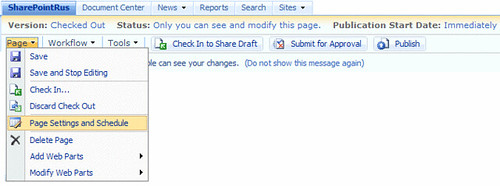
MOSS Publication Scheduling - Collaboration Portal Template A great info by Kathy Hughes MVP. To enable the "Page Settings and Schedule" menu option on a site provisioned using the Collaboration Portal site template, simply enable scheduling of items in the site's Pages document library. To do this using the browser:- ...
read more on http://mindsharpblogs.com/kathy/archive/2007/07/09/1954.aspx
Microsoft SharePoint Products and Technologies Team Blog
By understanding which manageability controls are configurable for each component of the Windows SharePoint Services hierarchy, you can design a Windows SharePoint Services 3.0 implementation that appropriately leverages these controls for the type of content that will be hosted.
The white paper Supporting Information Architecture with Windows SharePoint Services Manageability Controls provides detailed guidance for determining how specific types of content can be managed effectively with Windows SharePoint Services 3.0. (2 first articles...)
The white paper Supporting Information Architecture with Windows SharePoint Services Manageability Controls provides detailed guidance for determining how specific types of content can be managed effectively with Windows SharePoint Services 3.0. (2 first articles...)
Shared Documents - Microsoft Office SharePoint Conference 2008
 Thank you for expressing your interest in the Microsoft Office SharePoint Conference 2008 .
We will notify you when further information is available!
Thank you!The Microsoft Office SharePoint Conference Team
Mark Arend : Web part comparison: SPS 2003 & WSS v2 --> MOSS 2007 & WSS v3
Mark Arend : Web part comparison: SPS 2003 & WSS v2 --> MOSS 2007 & WSS v3: "Web parts shown in Gray were available in previous version, but not in current version.
Web parts shown in Green are available in previous version and current version
All other web parts are new to the current version."
Web parts shown in Green are available in previous version and current version
All other web parts are new to the current version."
7/10/2007
SharePoint FieldNotes (Steve Curran)
Information Management Policy is new to SharePoint but not to the world of Document Management. Office SharePoint Server 2007 has added many new Document Management capabilities your applications can take advantage of. ...
... Note: Please beware that after you have associated a policy with a content type and then make changes to the policy, the changes will not be reflected within the contentType until you un-associate and re-associate the policy with the content type. In addition, the label value will only be updated after policy changes if the item is updated. ...
... Note: Please beware that after you have associated a policy with a content type and then make changes to the policy, the changes will not be reflected within the contentType until you un-associate and re-associate the policy with the content type. In addition, the label value will only be updated after policy changes if the item is updated. ...
7/09/2007
7/08/2007
Microsoft SharePoint Designer Team Blog : Porting SharePoint Designer Workflows to Visual Studio
Microsoft SharePoint Designer Team Blog : Porting SharePoint Designer Workflows to Visual Studio: "When you have these files, rename the .rules file (if you have one) from *.xoml.rules to *.rules. Then add the .xoml and .rules files to your VS project. If you double click on the .xoml file in the Solution Explorer, the WF workflow designer should open, and you should see all your SPD actions in place. "
Microsoft SharePoint Designer Team Blog : How to Integrate Virtual Earth Maps with a SharePoint List
Microsoft SharePoint Designer Team Blog : How to Integrate Virtual Earth Maps with a SharePoint List
Read :... All Done! Back on the browser, when you go to the display form of any supplier, there’ll be a great map view that will show you the location of the supplier. You’ll be able to interact with the map, just like you would on http://local.live.com/. Thanks, Greg
Read :... All Done! Back on the browser, when you go to the display form of any supplier, there’ll be a great map view that will show you the location of the supplier. You’ll be able to interact with the map, just like you would on http://local.live.com/. Thanks, Greg
7/07/2007
Popfly and Sharepoint integration already?

Go and see the video of Mike Gannotti's where he tells you how to use Sharepoint as a datasource for PopFly: (3 datas sources in connection - no code) If you wanna know what PopFly is read this little snippet from Channel9: "You probably haven't heard of it, but you're also probably going to start hearing a lot about it in the near future. Popfly is being announced today - as I'm posting this, actually. To keep it short and simple so you can get right to watching the video, Popfly makes it easy for non-devs to create web sites, mashups, and more. Drag, drag, click - you've got a Flikr + Virtual Earth mashup. You can even point and click your way to a Vista Gadget. " (source Robin Meure).
If want to know more about PopFly check out these sites :
Microsoft PopFly site
Tweakers.NET newspost
Pages tagged with popfly on del.icio.us
Popfly
Popfly- Blogs, Photos, Videos and more on Technorat
A new info on this subject on the Microsoft SharePoint Products and Technologies Team Blog :
by Michael Gannotti, TSP SharePointMicrosoft Greater Southeast District
P. Erol GIRAUDY
Customizing and Branding Web Content Management-Enabled SharePoint Sites (Part 1 of 3): Understanding Web Content Management and the Default Features
Customizing and Branding Web Content Management-Enabled SharePoint Sites (Part 1 of 3): Understanding Web Content Management and the Default Features: "Customizing and Branding Web Content Management-Enabled SharePoint Sites (Part 1 of 3): Understanding Web Content Management and the Default Features
Summary: This article discusses topics that you should understand before you use Microsoft Office SharePoint Server 2007 to create sites that support Web content management (WCM) and gives a general overview of the various artifacts that are available in the product. (11 printed pages) by Patrick Tisseghem, U2U"
P. Erol GIRAUDY
http://clubmoss2007.org/
Summary: This article discusses topics that you should understand before you use Microsoft Office SharePoint Server 2007 to create sites that support Web content management (WCM) and gives a general overview of the various artifacts that are available in the product. (11 printed pages) by Patrick Tisseghem, U2U"
P. Erol GIRAUDY
http://clubmoss2007.org/
tonstegeman's blog
tonstegeman's blog: "This post describes an issue we were having using the SharePoint PageFieldFilter webpart in combination with a Lookup field. First the issue is explained, then a solution is provided."
You can find a WSP file containing a working version of the webpart. If you don’t know what to do with a wsp file, start looking at Chris Johnson’s blog, or use the SharePoint Solution Installer. Attached to this post, you will also find the full code for the webpart. Both are in the same ZIP file. Do whatever you like to do with them, but please let me know if you use them and what you think of it. Might give me some ideas to improve it. Enjoy!
You can find a WSP file containing a working version of the webpart. If you don’t know what to do with a wsp file, start looking at Chris Johnson’s blog, or use the SharePoint Solution Installer. Attached to this post, you will also find the full code for the webpart. Both are in the same ZIP file. Do whatever you like to do with them, but please let me know if you use them and what you think of it. Might give me some ideas to improve it. Enjoy!
7/06/2007
Microsoft TechEd IT Forum 2007

Microsoft TechEd IT Forum: " Sign In 'no comments, just do it !) 12-16 November 2007 Barcelona, Spain".
I Hope to be ATE this year, like in 2006. Barcelona is realy a great city.
P. Erol GIRAUDY
7/05/2007
SharePoint Farm Least Privilege and hotfix packages
SharePoint Farm Least Privilege and hotfix packages: "As previously discussed, it is possible to configure your SharePoint Farm to abide by the principle of least privilege. However there are some additional steps required if you have deployed any of the SharePoint Server 2007 hotfix packages dated later than April 12th 2007.
For the most part, the SharePoint Configuration Wizard (SCW) and Central Administration take care of assigning the necessary rights and group memberships. There are two exceptions with the RTM bits:
IWAMRegService Activation (aka DCOM 10016 issue)
%windir%/tasks" read more on : http://harbar.net/archive/2007/06/29/SharePoint-Farm-Least-Privilege-and-hotfix-packages.aspx
For the most part, the SharePoint Configuration Wizard (SCW) and Central Administration take care of assigning the necessary rights and group memberships. There are two exceptions with the RTM bits:
IWAMRegService Activation (aka DCOM 10016 issue)
%windir%/tasks" read more on : http://harbar.net/archive/2007/06/29/SharePoint-Farm-Least-Privilege-and-hotfix-packages.aspx
7/03/2007
Chapter 3: Customizing and Extending the Microsoft Office SharePoint 2007 Search (Part 1 AND 2)
Chapter 3: Customizing and Extending the Microsoft Office SharePoint 2007 Search (Part 1 and 2): "Chapter 3: Customizing and Extending the Microsoft Office SharePoint 2007 Search (Part 1 and 2)
This article is an excerpt from Inside Microsoft Office SharePoint Server 2007 by Patrick Tisseghem, from Microsoft Press (ISBN 9780735623682, copyright Microsoft Press 2007, all rights reserved). No part of this chapter may be reproduced, stored in a retrieval system, or transmitted in any form or by any means—electronic, electrostatic, mechanical, photocopying, recording, or otherwise—without the prior written permission of the publisher, except in the case of brief quotations embodied in critical articles or reviews. This excerpt is part 1 of 2.
In this chapter, I’ll start with a discussion of the architecture that makes it all happen behind the scenes and will continue with topics that will give you an understanding of how, as a developer, you can start customizing and extending the different features involved. I also refer to the Microsoft Office SharePoint Server 2007 Administrator’s Companion (Microsoft Press) authored by Bill English, for more detail of the topics related to the administration and configuration of the index and search engines."
http://msdn2.microsoft.com/en-us/library/bb608305.aspx
This article is an excerpt from Inside Microsoft Office SharePoint Server 2007 by Patrick Tisseghem, from Microsoft Press (ISBN 9780735623682, copyright Microsoft Press 2007, all rights reserved). No part of this chapter may be reproduced, stored in a retrieval system, or transmitted in any form or by any means—electronic, electrostatic, mechanical, photocopying, recording, or otherwise—without the prior written permission of the publisher, except in the case of brief quotations embodied in critical articles or reviews. This excerpt is part 2 of 2.
EROL
This article is an excerpt from Inside Microsoft Office SharePoint Server 2007 by Patrick Tisseghem, from Microsoft Press (ISBN 9780735623682, copyright Microsoft Press 2007, all rights reserved). No part of this chapter may be reproduced, stored in a retrieval system, or transmitted in any form or by any means—electronic, electrostatic, mechanical, photocopying, recording, or otherwise—without the prior written permission of the publisher, except in the case of brief quotations embodied in critical articles or reviews. This excerpt is part 1 of 2.
In this chapter, I’ll start with a discussion of the architecture that makes it all happen behind the scenes and will continue with topics that will give you an understanding of how, as a developer, you can start customizing and extending the different features involved. I also refer to the Microsoft Office SharePoint Server 2007 Administrator’s Companion (Microsoft Press) authored by Bill English, for more detail of the topics related to the administration and configuration of the index and search engines."
http://msdn2.microsoft.com/en-us/library/bb608305.aspx
This article is an excerpt from Inside Microsoft Office SharePoint Server 2007 by Patrick Tisseghem, from Microsoft Press (ISBN 9780735623682, copyright Microsoft Press 2007, all rights reserved). No part of this chapter may be reproduced, stored in a retrieval system, or transmitted in any form or by any means—electronic, electrostatic, mechanical, photocopying, recording, or otherwise—without the prior written permission of the publisher, except in the case of brief quotations embodied in critical articles or reviews. This excerpt is part 2 of 2.
EROL
7/01/2007
Web Site on WSS by a MVP: Mike Walsh
MVP: Mike Walsh
KB Articles
Articles - 2007 Products
MS Articles
Non-MS Articles
WSS FAQ
WSS v3 FAQ
2006 - Office 2007 Documents
KB Articles
Articles - 2007 Products
MS Articles
Non-MS Articles
WSS FAQ
WSS v3 FAQ
2006 - Office 2007 Documents
Support WebCast: Microsoft Office Outlook 2007 integration with Microsoft Windows SharePoint Services (WSS) version 3 Contact Lists and Document Libraries
Microsoft Office Outlook 2007 integration with Microsoft Windows SharePoint Services (WSS) version 3 Contact Lists and Document Libraries
This Support WebCast will demonstrate how to connect Microsoft Windows SharePoint Services (WSS) version 3 Contact Lists and Document Libraries to Outlook 2007.
It will also show a two-way synchronization between Contact Lists and Outlook 2007. The session will also talk about updating Document Library changes to the server. P. Erol GIRAUDY http://clubmoss2007.org/
This Support WebCast will demonstrate how to connect Microsoft Windows SharePoint Services (WSS) version 3 Contact Lists and Document Libraries to Outlook 2007.
It will also show a two-way synchronization between Contact Lists and Outlook 2007. The session will also talk about updating Document Library changes to the server. P. Erol GIRAUDY http://clubmoss2007.org/
6/30/2007
6/29/2007
SharePoint Land : SharePoint Screen Casts and Demos
Bob Fox one of the SharePoint MVPs recently included some screencasts on his blog. Watch for other screencasts coming down road. He's listened to me, I bet he would listen to you if you had suggestions for him.
How To Screencast: Creating Web Applications
How To Screencast: SP Administrators Desktop Shortcuts
How To Screencast: MOSS Backup and Restore
How To Screencast: Personalization Links and Audiences
How To Screencast: Customizing Tabbed Navigation
How To Screencast: Working with Managed Paths
You may already know that screencasts are out there.
Came across Asif's (MCT) site http://sharepoint-screencasts.com/ (what a novel domain name!) nicely categorized as using a SharePoint site to post them. The list below is a snapshot of his list as of this posting... Watch it for a best management of MOSS. EROL
How To Screencast: Creating Web Applications
How To Screencast: SP Administrators Desktop Shortcuts
How To Screencast: MOSS Backup and Restore
How To Screencast: Personalization Links and Audiences
How To Screencast: Customizing Tabbed Navigation
How To Screencast: Working with Managed Paths
You may already know that screencasts are out there.
Came across Asif's (MCT) site http://sharepoint-screencasts.com/ (what a novel domain name!) nicely categorized as using a SharePoint site to post them. The list below is a snapshot of his list as of this posting... Watch it for a best management of MOSS. EROL
6/28/2007
6/21/2007
3 CodePlex projects for community developed SharePoint WCM components
Microsoft SharePoint Products and Technologies Team Blog : Their SharePoint WCM projects and the currently available components are listed below:
SharePoint 2007 WCM Field Controls
SharePoint 2007 WCM Web Parts
SharePoint 2007 WCM Utilities
P. Erol GIRAUDY
http://clubmoss2007.org/
SharePoint 2007 WCM Field Controls
SharePoint 2007 WCM Web Parts
SharePoint 2007 WCM Utilities
P. Erol GIRAUDY
http://clubmoss2007.org/
6/20/2007
6/19/2007
Microsoft SharePoint Products and Technologies Team Blog : Completing the "Fantastic 40" – 20 remaining application templates now available, plus more!
Completing the "Fantastic 40" – 20 remaining application templates now available, plus more!
As I had alluded to about 3 weeks ago, the 20 remaining Application Templates of the “Fantastic 40” are now available for download! These server admin templates for Windows SharePoint Services 3.0 provide more enhanced functionality than the first 20 templates, including some with built-in workflows, heavily customized lists and libraries, and advanced data views. ... EROL
As I had alluded to about 3 weeks ago, the 20 remaining Application Templates of the “Fantastic 40” are now available for download! These server admin templates for Windows SharePoint Services 3.0 provide more enhanced functionality than the first 20 templates, including some with built-in workflows, heavily customized lists and libraries, and advanced data views. ... EROL
6/18/2007
Sharepoint Connections -- Home Page
November 5 - 8, 2007 Mandalay Bay Resort and CasinoLas Vegas, NV SharePoint Connections at the Mandalay Bay Resort and Casino Join thousands of Microsoft developers DBAs, and Admins and stay on top of the latest in SharePoint, ASP.NET, Visual Studio, SQL Server, .NET Framework 3.0, and more!
Train with Microsoft architects and top notch industry speakers and also network with your colleagues to build a valuable resource of peers Co-located with SharePoint Connections this fall will be: Microsoft® ASP.NET Connections, Visual Studio Connections, Mobile Connections, SQL Server Connections, Windows Connections and Exchange Connections, each with their own set of tracks and speakers. As an attendee of SharePoint Connections you may attend the sessions at any of the concurrent events.
Train with Microsoft architects and top notch industry speakers and also network with your colleagues to build a valuable resource of peers Co-located with SharePoint Connections this fall will be: Microsoft® ASP.NET Connections, Visual Studio Connections, Mobile Connections, SQL Server Connections, Windows Connections and Exchange Connections, each with their own set of tracks and speakers. As an attendee of SharePoint Connections you may attend the sessions at any of the concurrent events.
6/16/2007
Websites built on MOSS 2007
The list of public websites (from Angus Logan's Portals Blog) which are built on MOSS 2007 from the left hand side of my blog to this post.
Alphamosaik (Partner - France, Multilingual)
HedKandi
ShareView.co.uk
CORGI (UK)
speakTECH
Paul Mitchell
Tyler Butler
Microsoft-Oracle
ThreeWill
EmpowerID Demo
Oasys (French)
InfoCision
Ruijin Hospital Group
UCB (Une societe de BNP PARIBAS)
Satama
Reveu-d-Etudes (French)
Formextern (French)
Cegos (Professional Services) (French)
Sharesquared
FIFTEEN
Guildford Grammar School website by Vivid Group, the first MOSS 2007 site to go live in Australia!
Australian Innovation (2007 Innovation Festival) by Eclipse Group
JTC Corporation (Singapore Government)
APAC SharePoint Conference 2007 by Microsoft Australia and Unique World
AATorque (New Zealand bro)
Wise Woman by CodeAndContent
Komatsu (by UniqueWorld)
Ditributed Logic Platform (Partner)
MyTalk (Southern Cross by HotHouse)
Hawaiin Air
Performance Food Group (by Dominion Digital)
Plymouth Hospitals NHS Trust (AA Compliant)
Direct Energy
RBS Lynk (FSI)
McGrathNicol (by Dimension Data)
cScape
Games for Windows
WesternAustralia.com
Tourism Western Australia
Microsoft Flight Simulator Insider
Architecture Forum (Australia)
South East Water Limited (by SDM)
LivePoint (Partner)
EchoTechnology (by LivePoint)
Migros
Glu Mobile Games
Virtual TechEd 2007
Pierre Erol GIRAUDY
Pdt Club MOSS
http://clubmoss2007.org/
Alphamosaik (Partner - France, Multilingual)
HedKandi
ShareView.co.uk
CORGI (UK)
speakTECH
Paul Mitchell
Tyler Butler
Microsoft-Oracle
ThreeWill
EmpowerID Demo
Oasys (French)
InfoCision
Ruijin Hospital Group
UCB (Une societe de BNP PARIBAS)
Satama
Reveu-d-Etudes (French)
Formextern (French)
Cegos (Professional Services) (French)
Sharesquared
FIFTEEN
Guildford Grammar School website by Vivid Group, the first MOSS 2007 site to go live in Australia!
Australian Innovation (2007 Innovation Festival) by Eclipse Group
JTC Corporation (Singapore Government)
APAC SharePoint Conference 2007 by Microsoft Australia and Unique World
AATorque (New Zealand bro)
Wise Woman by CodeAndContent
Komatsu (by UniqueWorld)
Ditributed Logic Platform (Partner)
MyTalk (Southern Cross by HotHouse)
Hawaiin Air
Performance Food Group (by Dominion Digital)
Plymouth Hospitals NHS Trust (AA Compliant)
Direct Energy
RBS Lynk (FSI)
McGrathNicol (by Dimension Data)
cScape
Games for Windows
WesternAustralia.com
Tourism Western Australia
Microsoft Flight Simulator Insider
Architecture Forum (Australia)
South East Water Limited (by SDM)
LivePoint (Partner)
EchoTechnology (by LivePoint)
Migros
Glu Mobile Games
Virtual TechEd 2007
Pierre Erol GIRAUDY
Pdt Club MOSS
http://clubmoss2007.org/
Excel 2007 can now do two-way sync to a SharePoint List
.gif)
In Excel 2003 you were able to sync amendments both from a Excel 2003 spreadsheet to a SharePoint List and from a SharePoint List to an Excel 2003 spreadsheet. But in Excel 2007 this is no longer the case...
Well it was until Microsoft released an Excel 2007 Add-in.
This is a must install if you are upgrading to Office 2007 from Office 2003, otherwise your users will cry.
The Excel 2007 Add-in, can be downloaded from: http://www.microsoft.com/downloads/details.aspx?FamilyID=25836e52-1892-4e17-ac08-5df13cfc5295&DisplayLang=en
There is also an accompaning MSDN article "Publishing and Synchronizing Excel 2007 Tables to SharePoint Lists": http://msdn2.microsoft.com/en-us/library/bb462636(office.11).aspx
...
P. EROL GIRAUDY
Well it was until Microsoft released an Excel 2007 Add-in.
This is a must install if you are upgrading to Office 2007 from Office 2003, otherwise your users will cry.
The Excel 2007 Add-in, can be downloaded from: http://www.microsoft.com/downloads/details.aspx?FamilyID=25836e52-1892-4e17-ac08-5df13cfc5295&DisplayLang=en
There is also an accompaning MSDN article "Publishing and Synchronizing Excel 2007 Tables to SharePoint Lists": http://msdn2.microsoft.com/en-us/library/bb462636(office.11).aspx
...
P. EROL GIRAUDY
6/15/2007
6/14/2007
White paper: Information architecture in Office SharePoint Server
the goal of this paper is to communicate the logical approach that might occur during development and deployment. Many features in this paper are not applicable or available when using Microsoft Windows SharePoint Services 3.0.
P. Erol GIRAUDY
P. Erol GIRAUDY
6/07/2007
Forefront Security for SharePoint Virtual Lab

Forefront Security for SharePoint is an on-premise solution that provides comprehensive protection for SharePoint document libraries. Customers who purchase Forefront Security for SharePoint to protect Microsoft Office SharePoint Server 2007 or Microsoft Windows SharePoint Services version 3.0, will also be licensed to use Antigen for SharePoint to protect Microsoft SharePoint Portal Server 2003 and Microsoft Windows SharePoint Services 2.0 environments. Try the Lab and read the PDF
Event ID: 1032329673
Language(s): English.
Product(s): Security,SharePoint Portal Server,Windows Server.
Audience(s): IT Professional.
Duration: 90 Minutes
Start Date: Wednesday, February 07, 2007 12:00 AM
P. Erol GIRAUDY
Event ID: 1032329673
Language(s): English.
Product(s): Security,SharePoint Portal Server,Windows Server.
Audience(s): IT Professional.
Duration: 90 Minutes
Start Date: Wednesday, February 07, 2007 12:00 AM
P. Erol GIRAUDY
6/06/2007
APAC SharePoint Conference 2007
"Download session presentations and resources
Thank you to everyone who attended the APAC SharePoint Conference. The webcasts, blogs, wikis, session presentations and resources found here have been taken from the recent APAC SharePoint Conference 2007. Feel free to browse and review the content and download for your future reference.Download session presentations and resources
Thank you to everyone who attended the APAC SharePoint Conference. The webcasts, blogs, wikis, session presentations and resources found here have been taken from the recent APAC SharePoint Conference 2007. Feel free to browse and review the content and download for your future reference."
P. Erol GIRAUDY
http://clubmoss2007.org
Thank you to everyone who attended the APAC SharePoint Conference. The webcasts, blogs, wikis, session presentations and resources found here have been taken from the recent APAC SharePoint Conference 2007. Feel free to browse and review the content and download for your future reference.Download session presentations and resources
Thank you to everyone who attended the APAC SharePoint Conference. The webcasts, blogs, wikis, session presentations and resources found here have been taken from the recent APAC SharePoint Conference 2007. Feel free to browse and review the content and download for your future reference."
P. Erol GIRAUDY
http://clubmoss2007.org
6/05/2007
Microsoft SharePoint Products and Technologies Team Blog : SharePoint Conference 2008 to be held on March 2-6, 2008 in Seattle!

It's official! The SharePoint Conference 2008 will be held on March 2-6, 2008 in Seattle at the Washington State Trade and Convention Center.
What You Can Expect:
Keynote sessions by senior Microsoft executives
60+ sessions across several diverse tracks
Hands-on and instructor led labs
Go to http://www.mssharepointconference.com/ and submit your e-mail address, so you can be notified with important updates like when the conference website goes live on MOSS 2007.
----
What You Can Expect:
Keynote sessions by senior Microsoft executives
60+ sessions across several diverse tracks
Hands-on and instructor led labs
Go to http://www.mssharepointconference.com/ and submit your e-mail address, so you can be notified with important updates like when the conference website goes live on MOSS 2007.
----
P. Erol GIRAUDY
Pdt Club MOSS
Download details: MOSS 2007 Management Pack
"This Management Pack quickly brings any failures or configuration problems to your attention, which increases the availability and performance of Office SharePoint Server 2007. This Management Pack also provides the knowledge and expertise you need to leverage Operations Manager 2007 and get an immediate return on your investment.
Requires OpsMgr 2007 MOM 2005 Backward Compatibility MP Update) 6.0.5000.1 (or higher) Feature Bullet Summary"...
----
P. Erol GIRAUDY
Pdt Club MOSS
http://clubmoss2007.org/
Requires OpsMgr 2007 MOM 2005 Backward Compatibility MP Update) 6.0.5000.1 (or higher) Feature Bullet Summary"...
----
P. Erol GIRAUDY
Pdt Club MOSS
http://clubmoss2007.org/
Download details: WSS 3.0 Management Pack
The Microsoft Windows SharePoint Services 3.0 Management Pack monitors events placed in the application event log.
This Management Pack highlights events that might indicate possible service outages or configuration problems, so you can quickly take corrective or preventive actions. This Management Pack also provides the knowledge and expertise you need to leverage System Center Operations Manger 2007 and get an immediate return on your investment. Requires OpsMgr 2007 MOM 2005 Backward Compatibility MP Update) 6.0.5000.1 (or higher) Feature Bullet Summary:
• Monitors whether the application pool account has insufficient permission to add or read users from the Active Directory
• Monitors for issues arising from improper configuration of the authentication provider
• Monitors backup failures and recycle bin quotas
• Monitors for connectivity problems with computers running SQL server
• Monitors for issues arising from the deployment and topology of Windows SharePoint Services 3.0
• Monitors events related to the health of the tracing infrastructure
• Monitors connectivity with the SMTP server
• Monitors whether the application pool account has problems writing to disk or a registry key
• Monitors connectivity with Windows Rights Management Services servers
• Monitors performance counters
• Monitors events that are critical to the sound operation of the search service • Monitors Windows service availability
• Monitors events associated with the Timer service
• Monitors events associated with failures to load event handlers and safe control assembly paths Management Pack Release History: Initial Release for OpsMgr 2007 6/1/2007 Version 6.0.5000.0
----
P. Erol GIRAUDY
Pdt Club MOSS
http://clubmoss2007.org
This Management Pack highlights events that might indicate possible service outages or configuration problems, so you can quickly take corrective or preventive actions. This Management Pack also provides the knowledge and expertise you need to leverage System Center Operations Manger 2007 and get an immediate return on your investment. Requires OpsMgr 2007 MOM 2005 Backward Compatibility MP Update) 6.0.5000.1 (or higher) Feature Bullet Summary:
• Monitors whether the application pool account has insufficient permission to add or read users from the Active Directory
• Monitors for issues arising from improper configuration of the authentication provider
• Monitors backup failures and recycle bin quotas
• Monitors for connectivity problems with computers running SQL server
• Monitors for issues arising from the deployment and topology of Windows SharePoint Services 3.0
• Monitors events related to the health of the tracing infrastructure
• Monitors connectivity with the SMTP server
• Monitors whether the application pool account has problems writing to disk or a registry key
• Monitors connectivity with Windows Rights Management Services servers
• Monitors performance counters
• Monitors events that are critical to the sound operation of the search service • Monitors Windows service availability
• Monitors events associated with the Timer service
• Monitors events associated with failures to load event handlers and safe control assembly paths Management Pack Release History: Initial Release for OpsMgr 2007 6/1/2007 Version 6.0.5000.0
----
P. Erol GIRAUDY
Pdt Club MOSS
http://clubmoss2007.org
6/04/2007
Hiding Authoring Controls from Anonymous Users
This post is the first of a three-part series on building a blog in SharePoint from the ground up. In this series, we consider topics related to access control and anonymous access in particular, user interface customization and blogging from Word 2007.
We will also provide how-to guidelines for less-than-intuitive tasks. The access control and user interface customization topics are applicable to any SharePoint site.
http://www.sharepointplatform.com/teamblog/Lists/Posts/Post.aspx?ID=31
----
P. Erol GIRAUDY
Pdt Club MOSS
http://clubmoss2007.org
We will also provide how-to guidelines for less-than-intuitive tasks. The access control and user interface customization topics are applicable to any SharePoint site.
http://www.sharepointplatform.com/teamblog/Lists/Posts/Post.aspx?ID=31
----
P. Erol GIRAUDY
Pdt Club MOSS
http://clubmoss2007.org
SharePoint 2007 Installation Step by Step
SPStuff : SharePoint 2007 Installation Step by Step
Nice work for an instal.
----
P. Erol GIRAUDY
Pdt Club MOSS
http://clubmoss2007.org
Nice work for an instal.
----
P. Erol GIRAUDY
Pdt Club MOSS
http://clubmoss2007.org
6/03/2007
SharePoint Blogs Part I: Blog Access Control, Built-In Groups & Anonymous Users - SharePoint Platform Team Blog
This post is the first of a three-part series on building a blog in SharePoint from the ground up. In this series, we consider topics related to access control and anonymous access in particular, user interface customization and blogging from Word 2007.
We will also provide how-to guidelines for less-than-intuitive tasks.
The access control and user interface customization topics are applicable to any SharePoint site.
----
P. Erol GIRAUDY
Pdt Club MOSS
http://clubmoss2007.org
We will also provide how-to guidelines for less-than-intuitive tasks.
The access control and user interface customization topics are applicable to any SharePoint site.
----
P. Erol GIRAUDY
Pdt Club MOSS
http://clubmoss2007.org
Microsoft SharePoint Products and Technologies Team Blog : HiSoftware AccRepair for SharePoint Designer and AccMonitor bring accessibility compliance to SharePoint based websites
Since the widely referenced Improvements in Accessibility blog entry was posted here over a year, we have received numerous inquiries about how to further improve accessibility of SharePoint based websites up to the point of being fully compliant with standards such as the U.S. government’s Section 508 and the W3C’s Web Content Accessibility Guidelines (WCAG) 1.0.
Although we don’t have any updates beyond the aforementioned blog entry to announce right now, a few of our partners have been successful in helping customers implement accessibility compliant websites such as Wise Woman, and Plymouth Hospitals.
The SharePoint product group recognizes the importance of accessibility, especially for Internet facing public websites that have been built with SharePoint technology. To provide a channel for dialogue between our customers and partners with us as well as amongst themselves, I’m pleased to announce the creation of the Microsoft hosted SharePoint – Accessibility online forum.
With HiSoftware’s announcement last week of AccRepair for SharePoint Designer and in conjunction with AccMonitor, many customers will be able to design and implement accessibility compliant SharePoint based websites without costly consulting services or development resources. The following guest blog entry is written by Robert B. Yonaitis, Chief Technology Officer at HiSoftware.
----
P. Erol GIRAUDY
Pdt Club MOSS
http://clubmoss2007.org
Although we don’t have any updates beyond the aforementioned blog entry to announce right now, a few of our partners have been successful in helping customers implement accessibility compliant websites such as Wise Woman, and Plymouth Hospitals.
The SharePoint product group recognizes the importance of accessibility, especially for Internet facing public websites that have been built with SharePoint technology. To provide a channel for dialogue between our customers and partners with us as well as amongst themselves, I’m pleased to announce the creation of the Microsoft hosted SharePoint – Accessibility online forum.
With HiSoftware’s announcement last week of AccRepair for SharePoint Designer and in conjunction with AccMonitor, many customers will be able to design and implement accessibility compliant SharePoint based websites without costly consulting services or development resources. The following guest blog entry is written by Robert B. Yonaitis, Chief Technology Officer at HiSoftware.
----
P. Erol GIRAUDY
Pdt Club MOSS
http://clubmoss2007.org
Office SharePoint Server at Microsoft: 12TB and counting
MScott St. Jean is a program manager in Microsoft IT.
He makes sure that the largest SharePoint installation in the world keeps working. Mark Swenson is also a program manager in Microsoft IT.
His job is making sure that our intranet search is working, including things like making sure people can't find documents that they shouldn't have rights to. I sat down with them to talk about what it takes to migrate, and index, and upgrade 12 terabytes of data to the latest version.
If that wasn’t challenging enough, they started working with the products before they were the latest version, when they were still under development.
Their experience shook out a lot of bugs that were addressed before the real world had to deal with them. In addition to deployment and migration, we chatted about the backup and restore procedures for this multiple terabyte installation, and what happens when you tell everyone in the org to go ahead and create their own SharePoint sites. (in an outtake that I, um, took out, I asked the guys for their picks for the SuperBowl, and got one of the team names wrong. minus 100 cool points for me).
----
P. Erol GIRAUDY
Pdt Club MOSS
http://clubmoss2007.org
He makes sure that the largest SharePoint installation in the world keeps working. Mark Swenson is also a program manager in Microsoft IT.
His job is making sure that our intranet search is working, including things like making sure people can't find documents that they shouldn't have rights to. I sat down with them to talk about what it takes to migrate, and index, and upgrade 12 terabytes of data to the latest version.
If that wasn’t challenging enough, they started working with the products before they were the latest version, when they were still under development.
Their experience shook out a lot of bugs that were addressed before the real world had to deal with them. In addition to deployment and migration, we chatted about the backup and restore procedures for this multiple terabyte installation, and what happens when you tell everyone in the org to go ahead and create their own SharePoint sites. (in an outtake that I, um, took out, I asked the guys for their picks for the SuperBowl, and got one of the team names wrong. minus 100 cool points for me).
----
P. Erol GIRAUDY
Pdt Club MOSS
http://clubmoss2007.org
6/02/2007
Attending TechEd 2007 US
 At Tech·Ed 2007, IT professionals and developers from around the world are coming together to find out how Microsoft and its partners are tackling the toughest challenges in computing, and to get the tools and training to make an immediate impact for their businesses. Learn more about what’s in store for Tech·Ed 2007.
Watch the news and check out techedbloggers here:
http://www.virtualteched.com/Pages/default.aspx
P. Erol GIRAUDY
Pdt Club MOSS
http://clubmoss2007.org
6/01/2007
Microsoft Office SharePoint Server 2007 Receives U.S. Department of Defense 5015.2 Certification
William Baer : Microsoft Office SharePoint Server 2007 Receives U.S. Department of Defense 5015.2 Certification
Microsoft Office SharePoint Server 2007 has received U.S. Department of Defense 5015.2 certification. The 5015.2 standard on which the Department of Defense certification is based serves as the benchmark for government and corporate organizations that manage records and documents and is endorsed by the National Archives and Records Administration.
http://www.microsoft.com/presspass/press/2007/may07/05-29SharePointDoDPR.mspx
P. Erol GIRAUDY
Pdt Club MOSS
http://clubmoss2007.org
Microsoft Office SharePoint Server 2007 has received U.S. Department of Defense 5015.2 certification. The 5015.2 standard on which the Department of Defense certification is based serves as the benchmark for government and corporate organizations that manage records and documents and is endorsed by the National Archives and Records Administration.
http://www.microsoft.com/presspass/press/2007/may07/05-29SharePointDoDPR.mspx
P. Erol GIRAUDY
Pdt Club MOSS
http://clubmoss2007.org
Live Listings
 Automatically Find and Remove Dead or Duplicate Links Across Your Entire SharePoint Portal
This powerful feature is hindered by SharePoint Portal 2003's failure to remove old or expired area listings in a timely fashion.
This will result in a "404 Page Not Found" error for your users. echo LiveListings for SharePoint is a smart server based rich tool for Microsoft’s SharePoint Portal 2003 server that regularly scans your portal to automaticaly clean up dead or duplicate area listings (or links) in your portal.
That replaces hours of tedious manual work with a simple automated process.
----
That replaces hours of tedious manual work with a simple automated process.
----
Deploying and Optimizing a SharePoint Web Part That Calls Excel Web Services
Deploying and Optimizing a SharePoint Web Part That Calls Excel Web Services: "Deploying and Optimizing a SharePoint Web Part That Calls Excel Web Services
Summary: Learn how to deploy a Web Part by using deployment CABs, and how to improve the appearance and configurability of a Web Part. (10 printed pages)
Dan Battagin, Microsoft Corporation"
EROL
Summary: Learn how to deploy a Web Part by using deployment CABs, and how to improve the appearance and configurability of a Web Part. (10 printed pages)
Dan Battagin, Microsoft Corporation"
EROL
Writing a Filter Provider Web Part for Windows SharePoint Services 3.0
Writing a Filter Provider Web Part for Windows SharePoint Services 3.0: "Writing a Filter Provider Web Part for Windows SharePoint Services 3.0"
Read It :
Introduced in Windows SharePoint Services 3.0, filter Web Parts use the Web Part connection support to provide filter criteria from one Web Part (the "provider" Web Part) to another Web Part (the "consumer" Web Part). This makes it possible for developers to build more sophisticated applications incorporating the 2007 Microsoft Office system by enabling users to provide search and filter criteria.
To learn how to package and deploy the Geographic Region filter provider Web Part created in this Visual How To, and how to improve the appearance and configurability of a Web Part, see Deploying and Optimizing a SharePoint Web Part That Calls Excel Web Services.
Explore It :
Filter Web Parts Overview
Windows SharePoint Services Web Part Infrastructure
Walkthrough: Writing a Simple Filter Consumer Web Part Sample
ITransformableFilterValues Interface (Microsoft.SharePoint.WebPartPages)
EROL
Read It :
Introduced in Windows SharePoint Services 3.0, filter Web Parts use the Web Part connection support to provide filter criteria from one Web Part (the "provider" Web Part) to another Web Part (the "consumer" Web Part). This makes it possible for developers to build more sophisticated applications incorporating the 2007 Microsoft Office system by enabling users to provide search and filter criteria.
To learn how to package and deploy the Geographic Region filter provider Web Part created in this Visual How To, and how to improve the appearance and configurability of a Web Part, see Deploying and Optimizing a SharePoint Web Part That Calls Excel Web Services.
Explore It :
Filter Web Parts Overview
Windows SharePoint Services Web Part Infrastructure
Walkthrough: Writing a Simple Filter Consumer Web Part Sample
ITransformableFilterValues Interface (Microsoft.SharePoint.WebPartPages)
EROL
5/31/2007
System Requirements for Knowledge Network for Microsoft Office SharePoint Server 2007
This release features the following enhancements:
Back-off functionality to improve your experience when you are performing activities on your machine
Various performance enhancements on both the client and server
Improved keyword generation and quality
An inner-circle web part that highlights people closest to you and are most likely to assist with your query
Back-off functionality to improve your experience when you are performing activities on your machine
Various performance enhancements on both the client and server
Improved keyword generation and quality
An inner-circle web part that highlights people closest to you and are most likely to assist with your query
Déterminer si l'outil de ligne de commande Stsadm.exe a été exécuté avec un succès dans Windows SharePoint Services 3.0 et SharePoint Server 2007
L'outil de ligne de commande Stsadm.exe dans Windows SharePoint Services 3.0 et SharePoint Server 2007 recherche des erreurs de syntaxe. Cependant le Stsadm.exe outil de ligne de commande n'affiche pas a détaillé des messages sur l'opération réussite.
Lorsque l'opération Stsadm.exe échoue même, l'outil de ligne de commande Stsadm.exe ne peut afficher le message "Opération a correctement terminé".
Pour déterminer si l'outil de ligne de commande Stsadm.exe a été exécuté avec un succès, examinez les fichiers Unified Logging Service (ULS) qui se trouvent dans le dossier suivant :
Programmez le serveur de Files\Common Files\Microsoft Shared\Web Extensions\12\LOGS
Remarque :
le fichier journal utilise le format ServerName-Date-Time .log.
Par exemple lorsque vous utilisez l'outil de ligne de commande Stsadm.exe pour activer ou pour installer les fonctionnalités qui contiennent un nom ContentType d'élément qui contient du espace de fin tel que YourContentTypeName, le message suivant s'affiche :
Opération se terminer avec un succès.
L'élément ContentType n'est pas créé parce que le nom ContentType d'élément comprend du espace de fin, dans ce cas correctement.
En outre le fichier journal ULS contient le message d'erreur suivant :
STSADM.EXE (0x176C) 0x0A48 6t4c Windows SharePoint Services General SPContentTypeElement.ElementActivated() inattendu. A ignoré l'activation à cause d'InvalidName : "YourContentTypeName"
P. Erol GIRAUDY
Pdt du Club SharePoint
http://clubmoss2007.org
Lorsque l'opération Stsadm.exe échoue même, l'outil de ligne de commande Stsadm.exe ne peut afficher le message "Opération a correctement terminé".
Pour déterminer si l'outil de ligne de commande Stsadm.exe a été exécuté avec un succès, examinez les fichiers Unified Logging Service (ULS) qui se trouvent dans le dossier suivant :
Programmez le serveur de Files\Common Files\Microsoft Shared\Web Extensions\12\LOGS
Remarque :
le fichier journal utilise le format ServerName-Date-Time .log.
Par exemple lorsque vous utilisez l'outil de ligne de commande Stsadm.exe pour activer ou pour installer les fonctionnalités qui contiennent un nom ContentType d'élément qui contient du espace de fin tel que YourContentTypeName, le message suivant s'affiche :
Opération se terminer avec un succès.
L'élément ContentType n'est pas créé parce que le nom ContentType d'élément comprend du espace de fin, dans ce cas correctement.
En outre le fichier journal ULS contient le message d'erreur suivant :
STSADM.EXE (0x176C) 0x0A48 6t4c Windows SharePoint Services General SPContentTypeElement.ElementActivated() inattendu. A ignoré l'activation à cause d'InvalidName : "YourContentTypeName"
P. Erol GIRAUDY
Pdt du Club SharePoint
http://clubmoss2007.org
International Webcasts: CorasWorks - The Next Step in the Evolution of Collaboration
International Webcasts: CorasWorks - The Next Step in the Evolution of Collaboration
Project Management Solution on SharePoint 2007
Take control of your project data, let CorasWorks and SharePoint 2007 lead you to a place where accountability and visibility into your project teams can happen. See how CorasWorks is leveraging new capabilities in SharePoint by exposing them in a business context. Rein in orphaned sites into project views, consolidate group activities and project related meetings, and make effective decisions by reporting on holistic views of project statuses. Collaborate with all levels of project workers.
I would like to personally invite you to attend our upcoming CorasWorks Webcast, focused on how to easily build a Project Management Solution on SharePoint 2007.
Webcast: Building a Project Management Solution on SharePoint 2007
Date: 06 June 2007
Time: 12:30 - 14:00(GMT)
Location: At your desk
Cost: No Charge
Take control of your project data and let CorasWorks and SharePoint 2007 lead you to a place where accountability and visibility into your project teams can happen. See how CorasWorks is leveraging new capabilities in SharePoint by exposing them in a business context. Rein in orphaned sites into project views, consolidate group activities and project related meetings, and make effective decisions by reporting on holistic views of project statuses. Collaborate with all levels of project workers, for example:
Ground level resources - Interested in My Projects, My Tasks Documents assigned to me
Project Managers - Projects in danger, tasks I have assigned, send overdue notices to multiple recipients at the same time
Executives - Snap shots of data charting views, ability to drill into details
Click Here to Register for this Webcast!
http://www.corasworks.net/Events/International/Webcasts.asp
P. Erol GIRAUDY
Pdt Club SharePoint
http://clubmoss2007.org
Project Management Solution on SharePoint 2007
Take control of your project data, let CorasWorks and SharePoint 2007 lead you to a place where accountability and visibility into your project teams can happen. See how CorasWorks is leveraging new capabilities in SharePoint by exposing them in a business context. Rein in orphaned sites into project views, consolidate group activities and project related meetings, and make effective decisions by reporting on holistic views of project statuses. Collaborate with all levels of project workers.
I would like to personally invite you to attend our upcoming CorasWorks Webcast, focused on how to easily build a Project Management Solution on SharePoint 2007.
Webcast: Building a Project Management Solution on SharePoint 2007
Date: 06 June 2007
Time: 12:30 - 14:00(GMT)
Location: At your desk
Cost: No Charge
Take control of your project data and let CorasWorks and SharePoint 2007 lead you to a place where accountability and visibility into your project teams can happen. See how CorasWorks is leveraging new capabilities in SharePoint by exposing them in a business context. Rein in orphaned sites into project views, consolidate group activities and project related meetings, and make effective decisions by reporting on holistic views of project statuses. Collaborate with all levels of project workers, for example:
Ground level resources - Interested in My Projects, My Tasks Documents assigned to me
Project Managers - Projects in danger, tasks I have assigned, send overdue notices to multiple recipients at the same time
Executives - Snap shots of data charting views, ability to drill into details
Click Here to Register for this Webcast!
http://www.corasworks.net/Events/International/Webcasts.asp
P. Erol GIRAUDY
Pdt Club SharePoint
http://clubmoss2007.org
5/30/2007
Performing a SharePoint Gradual Upgrade using STSADM
Performing a SharePoint Gradual Upgrade using STSADM
In the Chapter 24 of the Microsoft Office Sharepoint Server 2007 Administrator's Companion, I detailed how to use the STSADM command to upgrade a number of site collections using the Gradual upgrade approach. This was based on knowledge that was available during the beta. With RTM code, the process is as follows:
Note: Ensure that the root site collection is upgraded before any other site collection in the Web Application. If multiple site collections are upgraded at one time, the root site collection must be included in the first set of site collections selected to be upgraded.
Read this book great informations inside
EROL
In the Chapter 24 of the Microsoft Office Sharepoint Server 2007 Administrator's Companion, I detailed how to use the STSADM command to upgrade a number of site collections using the Gradual upgrade approach. This was based on knowledge that was available during the beta. With RTM code, the process is as follows:
Note: Ensure that the root site collection is upgraded before any other site collection in the Web Application. If multiple site collections are upgraded at one time, the root site collection must be included in the first set of site collections selected to be upgraded.
Read this book great informations inside
EROL
5/29/2007
Shane Perran’s SharePoint Customization Blog » Blog Archive » TechED 2007
Shane Perran’s SharePoint Customization Blog » Blog Archive » TechED 2007
TechED 2007 is just around the corner, I know you will all be taking in the great SharePoint Breakouts, Chalk Talks and BOF’s, but save a little room for the IE Booth. There are some very interesting topics in the web standards space, and even more interesting speakers, including none other than Holly Holzschlag.
http://www.microsoft.com/events/teched2007/default.mspx
Great meeting, we expect the same in Spain for the Europe
P. Erol GIRAUDY
Pdt Club MOSS
http://clubmoss2007.org
TechED 2007 is just around the corner, I know you will all be taking in the great SharePoint Breakouts, Chalk Talks and BOF’s, but save a little room for the IE Booth. There are some very interesting topics in the web standards space, and even more interesting speakers, including none other than Holly Holzschlag.
http://www.microsoft.com/events/teched2007/default.mspx
Great meeting, we expect the same in Spain for the Europe
P. Erol GIRAUDY
Pdt Club MOSS
http://clubmoss2007.org
Joel Oleson's SharePoint Land
Joel Oleson's SharePoint Land: "How to Create a Blog and Get Search Results
From my last post I got a few questions about how or where to create a blog. Lately I've been thinking about how I can encourage more and more to blog since I've been seeing the benefits from those who blog and suffering as a result of those who fail to share. We speak of all the duplication we all do as a result of not being able to get search results. There's simply a ton of content behind the firewall that with special consideration and a bit of effort could benefit everyone. Be sure to find out what your corporate policy if there is one on blogging, but if you're reading this, you've likely read a few blogs and hence have benefited from bloggers. So comes the clarion call... Join the SharePoint Blogging Revolution!"
EROL
http://clubmoss2007.org
From my last post I got a few questions about how or where to create a blog. Lately I've been thinking about how I can encourage more and more to blog since I've been seeing the benefits from those who blog and suffering as a result of those who fail to share. We speak of all the duplication we all do as a result of not being able to get search results. There's simply a ton of content behind the firewall that with special consideration and a bit of effort could benefit everyone. Be sure to find out what your corporate policy if there is one on blogging, but if you're reading this, you've likely read a few blogs and hence have benefited from bloggers. So comes the clarion call... Join the SharePoint Blogging Revolution!"
EROL
http://clubmoss2007.org
5/28/2007
Download details: Microsoft SharePoint Products and Technologies Document: Transform Your Business with SharePoint Products and Technologies
Download details: Microsoft SharePoint Products and Technologies Document: Transform Your Business with SharePoint Products and Technologies: "Microsoft Office SharePoint Server 2007 is a business productivity server that brings information management and access, collaboration, and people-driven processes into the familiar environment where people do their work every day. People benefit from the familiarity and consistency of a single environment for all their information and collaboration tasks that is easy to learn, use, and personalize. IT has a single platform and well-integrated set of technologies to manage and lower user support requirements.
Your business can rapidly customize and extend the deployment of SharePoint Products and Technologies—Office SharePoint Server 2007, Microsoft Windows SharePoint Services, and Microsoft Office SharePoint Designer 2007—by using powerful out-of-the-box integration to extend current investments. Or your business can choose from a wide ecosystem of Microsoft partners to develop innovative enterprise applications quickly and at lower cost. With SharePoint Products and Technologies, your organizations can more easily leverage their knowledge capital of enterprise data, human expertise, process knowledge, and content to operate with greater agility in a dynamic and complex world."
P. Erol GIRAUDY
Your business can rapidly customize and extend the deployment of SharePoint Products and Technologies—Office SharePoint Server 2007, Microsoft Windows SharePoint Services, and Microsoft Office SharePoint Designer 2007—by using powerful out-of-the-box integration to extend current investments. Or your business can choose from a wide ecosystem of Microsoft partners to develop innovative enterprise applications quickly and at lower cost. With SharePoint Products and Technologies, your organizations can more easily leverage their knowledge capital of enterprise data, human expertise, process knowledge, and content to operate with greater agility in a dynamic and complex world."
P. Erol GIRAUDY
5/01/2007
SharePoint Server 2007 Template
Role-Based My Site for Sales Account Managers
Role-Based My Site for Controllers-Financial Analysts
GroupBoard Workspace 2007
Office SharePoint Server 2007 Guide: Setting up the Role-Based My Site Template for Controllers-Financial Analysts
This setup document provides step-by-step instructions to initialize the Controller-Financial Analyst template in Microsoft Office SharePoint Server 2007.
Office SharePoint Server 2007 Guide: Setting up the Role-Based My Site Template for Sales Account Managers
This setup document provides step-by-step instructions to initialize the Sales Account Manager template for Microsoft Office SharePoint Server 2007.
--
P. Erol GIRAUDY MVP MOSS
www.clubsmoss2007.org
www.shareclubs.org
Role-Based My Site for Controllers-Financial Analysts
GroupBoard Workspace 2007
Office SharePoint Server 2007 Guide: Setting up the Role-Based My Site Template for Controllers-Financial Analysts
This setup document provides step-by-step instructions to initialize the Controller-Financial Analyst template in Microsoft Office SharePoint Server 2007.
Office SharePoint Server 2007 Guide: Setting up the Role-Based My Site Template for Sales Account Managers
This setup document provides step-by-step instructions to initialize the Sales Account Manager template for Microsoft Office SharePoint Server 2007.
--
P. Erol GIRAUDY MVP MOSS
www.clubsmoss2007.org
www.shareclubs.org
Change passwords used for administration accounts (Office SharePoint Server)
Use this task to change the password information for several features, services, and Web applications in Microsoft Office SharePoint Server 2007. Domain policies often require that domain account passwords be updated periodically.
This change provides additional security in case one of the passwords might have been compromised.
You can configure the various features, services, and Web applications of Office SharePoint Server 2007 to run as a domain account.
Because domain policy might require passwords to expire regularly, you might have to change the passwords for these accounts for these features, services, and Web applications to continue to function properly. Updated: April 19, 2007.
Administering security credentials (Office SharePoint Server)
--
P. Erol GIRAUDY MVP MOSS
www.clubmoss2007.org
www.shareclubs.org
This change provides additional security in case one of the passwords might have been compromised.
You can configure the various features, services, and Web applications of Office SharePoint Server 2007 to run as a domain account.
Because domain policy might require passwords to expire regularly, you might have to change the passwords for these accounts for these features, services, and Web applications to continue to function properly. Updated: April 19, 2007.
Administering security credentials (Office SharePoint Server)
--
P. Erol GIRAUDY MVP MOSS
www.clubmoss2007.org
www.shareclubs.org
4/16/2007
Office SharePoint Server 2007 Guide for MY SITE for Account Managers and Financial Analysts
Setting up the Role-Based My Site Template for Sales Account Managers 15 pages.
Setting up the Role-Based My Site Template for Controllers-Financial Analysts 18 pages.
--
P. Erol GIRAUDY MVP MOSS
www.clubsps.org
www.shareclubs.org
Setting up the Role-Based My Site Template for Controllers-Financial Analysts 18 pages.
--
P. Erol GIRAUDY MVP MOSS
www.clubsps.org
www.shareclubs.org
4/15/2007
Guidelines using SharePoint 2007
Maybe it is time to write down some guidelines that you should keep in mind while working with SharePoint 2007, or you could just ignore them as well. I found these guidelines in Blogs, articles on the internet but I wanted to group them together. ...
http://www.u2u.info/Blogs/Kevin/Lists/Posts/Post.aspx?ID=7
These guidelines are not hard limits, meaning if you have 2005 lists on a site, your site will still work. The only thing that could happen by adding more items is that your performance could decrease.
--
P. Erol GIRAUDY MVP MOSS
www.clubsps.org
www.clubmoss2007.org
www.shareclubs.org
http://www.u2u.info/Blogs/Kevin/Lists/Posts/Post.aspx?ID=7
These guidelines are not hard limits, meaning if you have 2005 lists on a site, your site will still work. The only thing that could happen by adding more items is that your performance could decrease.
--
P. Erol GIRAUDY MVP MOSS
www.clubsps.org
www.clubmoss2007.org
www.shareclubs.org
4/13/2007
ARB Security Solutions is a full service security organization
Microsoft Office Server System (SharePoint 2007), like any other web based application, is subject to attackers for both internal as well as external threats. Using security policies and security software, it is possible to mitigate these risks.
The security of SharePoint Portal Server is often one of the most overlooked implementation and maintenance concerns with any deployment, even though 75% of cyber attacks are done at the weblevel. We recognized this gap and seek to provide our customers with all of the rich team services and collaboration tools in SharePoint while ensuring the integrity of data.
--
P. Erol GIRAUDY MVP MOSS
www.clubsps.org
www.shareclubs.org
The security of SharePoint Portal Server is often one of the most overlooked implementation and maintenance concerns with any deployment, even though 75% of cyber attacks are done at the weblevel. We recognized this gap and seek to provide our customers with all of the rich team services and collaboration tools in SharePoint while ensuring the integrity of data.
--
P. Erol GIRAUDY MVP MOSS
www.clubsps.org
www.shareclubs.org
4/02/2007
CSS Reference Chart for SharePoint 2007 - PDF Version
Heather Solomon, the "MVP queen of SharePoint style", has put together a fabulous CSS reference for SharePoint 2007.
This covers both Microsoft Office SharePoint Server (MOSS) and Windows SharePoint Services (WSS) and displays the name of the style along with an example and where the style is defined in what file. Brilliant.
I've put together a PDF version of the reference guide if you're into that. You can download the 12 page reference guide from here.
Heather's original online version can be found here.
--
P. Erol GIRAUDY MVP MOSS
www.clubmoss2007.org
www.shareclubs.org
This covers both Microsoft Office SharePoint Server (MOSS) and Windows SharePoint Services (WSS) and displays the name of the style along with an example and where the style is defined in what file. Brilliant.
I've put together a PDF version of the reference guide if you're into that. You can download the 12 page reference guide from here.
Heather's original online version can be found here.
--
P. Erol GIRAUDY MVP MOSS
www.clubmoss2007.org
www.shareclubs.org
3/26/2007
Floating ToolPane for SharePoint 2007
Ever been frustrated that the tool pane in SharePoint takes up your screen real estate, or that you have to scroll to see the buttons when editing a WebPart? ... If so, this is for you...
Following on from my previous post (which got a bit too long to mention this) the SharePoint controls include another useful addition...a floating toolpane for SharePoint. With two lines added to you site master page you can have all your tool panes appear in a floating window which is sizeable and can be minimized!
--
P. Erol GIRAUDY MVP MOSS
www.clubmoss2007.org
www.shareclubs.org
Following on from my previous post (which got a bit too long to mention this) the SharePoint controls include another useful addition...a floating toolpane for SharePoint. With two lines added to you site master page you can have all your tool panes appear in a floating window which is sizeable and can be minimized!
--
P. Erol GIRAUDY MVP MOSS
www.clubmoss2007.org
www.shareclubs.org
3/25/2007
Downloadable books for Office SharePoint Server 2007
Downloadable books for Office SharePoint Server 2007 Updated: March 15, 2007
Some of the content in the Office SharePoint Server technical library is available in downloadable and printable form as Microsoft Office Word documents (.doc files).
The content in these 4 books is a copy of selected content in the Office SharePoint Server technical library (http://go.microsoft.com/fwlink/?LinkId=84739) as of the date listed for each book.
The 4 books for WSSv3 are here :
http://technet2.microsoft.com/windowsserver/WSS/en/library/decec839-73d9-4e23-b167-11e05dfc2feb1033.mspx?mfr=true
For the most current content, see the technical library on the Web.
--
P. Erol GIRAUDY MVP MOSS
www.clubmoss2007.org
www.shareclubs.org
Some of the content in the Office SharePoint Server technical library is available in downloadable and printable form as Microsoft Office Word documents (.doc files).
The content in these 4 books is a copy of selected content in the Office SharePoint Server technical library (http://go.microsoft.com/fwlink/?LinkId=84739) as of the date listed for each book.
The 4 books for WSSv3 are here :
http://technet2.microsoft.com/windowsserver/WSS/en/library/decec839-73d9-4e23-b167-11e05dfc2feb1033.mspx?mfr=true
For the most current content, see the technical library on the Web.
--
P. Erol GIRAUDY MVP MOSS
www.clubmoss2007.org
www.shareclubs.org
3/24/2007
Microsoft Office Groove and SharePoint Integration
This document discusses the you can integrate Groove and SharePoint to enhance and facilitate collaboration in your enterprise.
--
P. Erol GIRAUDY MVP MOSS
www.clubmoss2007.org
www.shareclubs.org
--
P. Erol GIRAUDY MVP MOSS
www.clubmoss2007.org
www.shareclubs.org
3/22/2007
Using the BDC feature of MOSS 2007 to interact with information stored in external data sources, for example SQL Server and Oracle data bases - Part 2
Many enterprises manage a lot of information stored in data bases that are distinct that the ones used by SharePoint (SQL Server), for example internal applications like CRM’s, ERP’s or any other application developed by themselves, we could say “in house”. Now, we know that all the documents we upload to SharePoint Sites are stored in SQL Server. So, we have SharePoint data from one hand, and external information stored in other data sources on the other hand.
Is there any chance to provide final users the possibility to have only one web site to work with SharePoint data and also to interact with information stored in external data sources, through the same SharePoint Site?
Guess What!!, we have now the power of the Business Data Catalog, that allow us to interact with information stored in distinct sources and not necessarily need to be in SharePoint data bases. What’s the beauty of this, we can provide to our users the possibility to have one site (site collection) working with SharePoint data, from document libraries, lists and everything you know from SharePoint, but also with other kind of data…external data.
--
P. Erol GIRAUDY MVP MOSS
www.clubmoss2007.org
www.shareclubs.org
Is there any chance to provide final users the possibility to have only one web site to work with SharePoint data and also to interact with information stored in external data sources, through the same SharePoint Site?
Guess What!!, we have now the power of the Business Data Catalog, that allow us to interact with information stored in distinct sources and not necessarily need to be in SharePoint data bases. What’s the beauty of this, we can provide to our users the possibility to have one site (site collection) working with SharePoint data, from document libraries, lists and everything you know from SharePoint, but also with other kind of data…external data.
--
P. Erol GIRAUDY MVP MOSS
www.clubmoss2007.org
www.shareclubs.org
3/20/2007
Estimate performance and capacity requirements for search environments
Usage profile : The following tables show the usage profile for the Office SharePoint Server 2007 search test environment.
Type of document - Number of documents -
Content on SharePoint sites 10 million items, including the following:
• 420 site collections
• 4,000 sites
• 24,200 lists
• 47,780 document libraries
Content on file shares 15 million items
HTTP content 15 million items
People profiles 2.5 million
Stitch (in-memory test tool that generates documents in memory) 7.5 million
Properties (metadata) 1 million
---
Read also : Recommendations
This section provides general performance and capacity recommendations. Use these recommendations to determine the capacity and performance characteristics of the starting topology that you created in Plan for availability (Office SharePoint Server) , and to determine whether you need to scale out or scale up the starting topology.
--
P. Erol GIRAUDY MVP MOSS
www.clubmoss2007.org
www.shareclubs.org
Type of document - Number of documents -
Content on SharePoint sites 10 million items, including the following:
• 420 site collections
• 4,000 sites
• 24,200 lists
• 47,780 document libraries
Content on file shares 15 million items
HTTP content 15 million items
People profiles 2.5 million
Stitch (in-memory test tool that generates documents in memory) 7.5 million
Properties (metadata) 1 million
---
Read also : Recommendations
This section provides general performance and capacity recommendations. Use these recommendations to determine the capacity and performance characteristics of the starting topology that you created in Plan for availability (Office SharePoint Server) , and to determine whether you need to scale out or scale up the starting topology.
--
P. Erol GIRAUDY MVP MOSS
www.clubmoss2007.org
www.shareclubs.org
3/16/2007
Windows SharePoint Services 3.0 Tools: Visual Studio 2005 Extensions
Brief Description : (Visual Studio 2005 extensions for Windows SharePoint Services 3.0, Version 1.0)Tools for developing custom SharePoint applications: Visual Studio project templates for Web Parts, site definitions, and list definitions; and a stand-alone utility program, the SharePoint Solution Generator.
--
P. Erol GIRAUDY MVP MOSS
www.clubmoss2007.org
www.shareclubs.org
--
P. Erol GIRAUDY MVP MOSS
www.clubmoss2007.org
www.shareclubs.org
SharePoint Server 2007 Language Pack
Brief Description : Language packs enable creation of SharePoint sites and site collections in multiple languages without requiring separate installations of SharePoint Server 2007. Multiple language packs can be installed on the same server. Application of a Language Pack will not change the language of the installed Office server product SKU, or the language of the administrative features.
--
P. Erol GIRAUDY MVP MOSS
www.clubmoss2007.org
www.shareclubs.org
--
P. Erol GIRAUDY MVP MOSS
www.clubmoss2007.org
www.shareclubs.org
3/10/2007
SharePoint Server 2007 Presentations: Enterprise Search Deep Dives
Brief Description : This download provides six detailed presentations on enterprise search in Microsoft Office SharePoint Server 2007. This download presents packaged presentations and videos of the following conference sessions:
Enterprise Search Strategy and Opportunities (SharePointServer2007SearchDeepDiveA.exe) This session starts with an overview of Microsoft's enterprise search strategy, reviews the various products that it affects, and outlines what is new in SharePoint Search for the 2007 Microsoft Office system. Lastly, it discusses opportunities for partners building on the platform.
SharePoint Search Extensibility (SharePointServer2007SearchDeepDiveB.exe) This session addresses the core extensibility scenarios in Microsoft Office SharePoint Server 2007 (MOSS) search, such as customizing the user interface, custom search using client applications, and crawling new repositories, including line-of-business data. It also covers the administration object model.
Protocol Handlers and IFilters (SharePointServer2007SearchDeepDiveC.exe) Learn about the overall architecture of Microsoft Office SharePoint Server 2007 (MOSS) search. Protocol Handlers and iFilter interfaces are described in detail with code examples.
Customizing and Extending Search in Office SharePoint Server 2007 (SharePointServer2007SearchDeepDiveD.exe) Learn how to customize Microsoft Office
SharePoint Server 2007 (MOSS) search user interface and build search based applications in this session. Branding, Web parts and extending search using the object model and Web services are discussed.
Business Data Search (SharePointServer2007SearchDeepDiveE.exe) The Business Data Catalog (BDC) enables search to reach into line-of-business repositories and provide integrated search results. Learn about the Business Data Catalog including the design motivations, scenarios, and the apis.
SharePoint Search Deployment Scenarios (SharePointServer2007SearchDeepDiveF.exe) This session reviews both Windows SharePoint Services 3.0 and Office SharePoint Server 2007 search topologies, and various deployment scenarios such as a collaboration environment, enterprise portals, and internet facing portals.
--
P. Erol GIRAUDY MVP MOSS
www.clubmoss2007.org
www.shareclubs.org
Enterprise Search Strategy and Opportunities (SharePointServer2007SearchDeepDiveA.exe) This session starts with an overview of Microsoft's enterprise search strategy, reviews the various products that it affects, and outlines what is new in SharePoint Search for the 2007 Microsoft Office system. Lastly, it discusses opportunities for partners building on the platform.
SharePoint Search Extensibility (SharePointServer2007SearchDeepDiveB.exe) This session addresses the core extensibility scenarios in Microsoft Office SharePoint Server 2007 (MOSS) search, such as customizing the user interface, custom search using client applications, and crawling new repositories, including line-of-business data. It also covers the administration object model.
Protocol Handlers and IFilters (SharePointServer2007SearchDeepDiveC.exe) Learn about the overall architecture of Microsoft Office SharePoint Server 2007 (MOSS) search. Protocol Handlers and iFilter interfaces are described in detail with code examples.
Customizing and Extending Search in Office SharePoint Server 2007 (SharePointServer2007SearchDeepDiveD.exe) Learn how to customize Microsoft Office
SharePoint Server 2007 (MOSS) search user interface and build search based applications in this session. Branding, Web parts and extending search using the object model and Web services are discussed.
Business Data Search (SharePointServer2007SearchDeepDiveE.exe) The Business Data Catalog (BDC) enables search to reach into line-of-business repositories and provide integrated search results. Learn about the Business Data Catalog including the design motivations, scenarios, and the apis.
SharePoint Search Deployment Scenarios (SharePointServer2007SearchDeepDiveF.exe) This session reviews both Windows SharePoint Services 3.0 and Office SharePoint Server 2007 search topologies, and various deployment scenarios such as a collaboration environment, enterprise portals, and internet facing portals.
--
P. Erol GIRAUDY MVP MOSS
www.clubmoss2007.org
www.shareclubs.org
2/22/2007
Templates (40) for Windows SharePoint Services 3.0 plus the Application Template Core solution
This download package includes all forty of the Application Templates for Microsoft Windows SharePoint Services 3.0 plus the Application Template Core solution, which is required to deploy server administration templates.
--
P. Erol GIRAUDY MVP MOSS
http://clubsmoss2007.org
www.shareclubs.org
--
P. Erol GIRAUDY MVP MOSS
http://clubsmoss2007.org
www.shareclubs.org
2/20/2007
Microsoft SQL Server 2005 Reporting Services Add-in for Microsoft SharePoint Technologies
The Microsoft SQL Server 2005 Reporting Services Add-in for Microsoft SharePoint Technologies is a Web download that provides features for running a report server within a larger deployment of Windows SharePoint Services 3.0 or Microsoft Office SharePoint Server 2007. (see : http://blogs.msdn.com/sharepoint/archive/2007/02/19/microsoft-sql-server-2005-sp2-reporting-services-integration-with-wss-3-0-and-moss-2007.aspx and
5.0 Features in This Release (in english - french and...) :
An example URL for a file uploaded to Shared Documents on the top-level site of a SharePoint Web application might be :
http://example-server-name/Shared Documents/CompanySales.rdl.
The URL must include a file name extension.
If the library is on a site, you must also include any sites and subsites before the library.
---
For more information,
see "Deploying Reports, Models, and Shared Data Sources to a SharePoint Site" in SQL Server Books Online.
---
Create new shared data source (.rsds) files from a SharePoint site to use with the reports and models that you add to the library. A new file name extension named .rsds is introduced in this release; it is used for shared data source files that you create and store in a library.
Use the new Report Viewer Web Part to view reports.
Use Report Builder from a SharePoint site. You can open or modify an existing Report Builder report definition file from a library. You can load a model in Report Builder to create new reports from report model (.smdl) files that have been uploaded or published to a SharePoint library.
Use new Web pages and configuration options to set permissions and properties on reports (.rdl), models (.smdl), resources, and shared data sources (.rsds) that you add or create on a SharePoint site. You can also use Web application pages to define schedules and subscriptions.
---
Note:
Earlier versions of Reporting Services include two Web Parts that provide minimal integration between a report server and a SharePoint site.
Those Web Parts are not part of the Reporting Services Add-in and have different requirements and functionality.
---
For more information
about how those Web Parts compare with the Web Part that is included in the Reporting Services Add-in, see "Comparing Levels of Integration Across Versions of Reporting Services and SharePoint Technologies" in SQL Server Books Online.
http://www.microsoft.com/sql/default.mspx
---
SP2 SQL : Download Service Pack 2 for Microsoft SQL Server 2005.
http://www.microsoft.com/downloads/details.aspx?displaylang=en&FamilyID=d07219b2-1e23-49c8-8f0c-63fa18f26d3a
--
P. Erol GIRAUDY - MVP MOSS
www.clubmoss2007.org
www.shareclubs.org
5.0 Features in This Release (in english - french and...) :
- This section summarizes the available features when you run a report server in SharePoint integrated mode.
- Use the revised Reporting Services Configuration tool to create a report server database in SharePoint integrated mode.
- Use the new report server configuration pages in Central Administration to grant the service accounts access to the SharePoint configuration and content databases.
- Use SharePoint security to control access to report server content and operations.
- Add reports and models that you created in SQL Server 2005 Reporting Services design tools to a SharePoint library. You can publish reports from Report Designer, or use the Upload action on a SharePoint library to upload any report server item. If you publish the files, be sure to specify fully qualified URLs.
An example URL for a file uploaded to Shared Documents on the top-level site of a SharePoint Web application might be :
http://example-server-name/Shared Documents/CompanySales.rdl.
The URL must include a file name extension.
If the library is on a site, you must also include any sites and subsites before the library.
---
For more information,
see "Deploying Reports, Models, and Shared Data Sources to a SharePoint Site" in SQL Server Books Online.
---
Create new shared data source (.rsds) files from a SharePoint site to use with the reports and models that you add to the library. A new file name extension named .rsds is introduced in this release; it is used for shared data source files that you create and store in a library.
Use the new Report Viewer Web Part to view reports.
Use Report Builder from a SharePoint site. You can open or modify an existing Report Builder report definition file from a library. You can load a model in Report Builder to create new reports from report model (.smdl) files that have been uploaded or published to a SharePoint library.
Use new Web pages and configuration options to set permissions and properties on reports (.rdl), models (.smdl), resources, and shared data sources (.rsds) that you add or create on a SharePoint site. You can also use Web application pages to define schedules and subscriptions.
---
Note:
Earlier versions of Reporting Services include two Web Parts that provide minimal integration between a report server and a SharePoint site.
Those Web Parts are not part of the Reporting Services Add-in and have different requirements and functionality.
---
For more information
about how those Web Parts compare with the Web Part that is included in the Reporting Services Add-in, see "Comparing Levels of Integration Across Versions of Reporting Services and SharePoint Technologies" in SQL Server Books Online.
http://www.microsoft.com/sql/default.mspx
---
SP2 SQL : Download Service Pack 2 for Microsoft SQL Server 2005.
http://www.microsoft.com/downloads/details.aspx?displaylang=en&FamilyID=d07219b2-1e23-49c8-8f0c-63fa18f26d3a
--
P. Erol GIRAUDY - MVP MOSS
www.clubmoss2007.org
www.shareclubs.org
2/18/2007
MOSS 2007 and Related Technologies pricing
Check out the licence pricing model for MOSS 2007 (finally). These are the US prices, but it gives a good impression.
http://office.microsoft.com/en-us/sharepointserver/FX102176831033.aspx
Servers Estimated Price
Office SharePoint Server 2007 $4424
Office SharePoint Server 2007 for Search Standard $8213
Office SharePoint Server 2007 for Search Enterprise $57,670
Office Forms Server 2007 $4424
Client Access Licenses Estimated Price
Office SharePoint Server 2007 Standard CAL $94
Office SharePoint Server 2007 Enterprise CAL1 $75
Office Forms Server 2007 CAL $54
Office SharePoint Designer 2007 $187
Internet Facing Sites Estimated Price
Office SharePoint Server 2007 for Internet sites $40,943
Office Forms Server 2007 for Internet sites $22,118
----
1
To be licensed for the Enterprise Edition functionality of Office SharePoint Server 2007, both the Standard and Enterprise client access licenses are required.
--
P. Erol GIRAUDY MVP MOSS
www.clubmoss2007.org
www.shareclubs.org
http://office.microsoft.com/en-us/sharepointserver/FX102176831033.aspx
Servers Estimated Price
Office SharePoint Server 2007 $4424
Office SharePoint Server 2007 for Search Standard $8213
Office SharePoint Server 2007 for Search Enterprise $57,670
Office Forms Server 2007 $4424
Client Access Licenses Estimated Price
Office SharePoint Server 2007 Standard CAL $94
Office SharePoint Server 2007 Enterprise CAL1 $75
Office Forms Server 2007 CAL $54
Office SharePoint Designer 2007 $187
Internet Facing Sites Estimated Price
Office SharePoint Server 2007 for Internet sites $40,943
Office Forms Server 2007 for Internet sites $22,118
----
1
To be licensed for the Enterprise Edition functionality of Office SharePoint Server 2007, both the Standard and Enterprise client access licenses are required.
--
P. Erol GIRAUDY MVP MOSS
www.clubmoss2007.org
www.shareclubs.org
2/16/2007
2007 Office System Tool: Microsoft Best Practices Analyzer for Windows SharePoint Services 3.0 and the 2007 Microsoft Office System

Brief Description : The Microsoft Best Practices Analyzer for Microsoft Windows SharePoint Services 3.0 and the 2007 Microsoft Office System creates detailed reports to help administrators achieve greater performance, scalability, and uptime. This tools for 2007 Office System : Microsoft Best Practices Analyzer for Windows SharePoint Services 3.0 and the 2007 Microsoft Office System. After the analysis is complete, open sharepointbpa.report.htm in a web browser. See also my web site on the tools for MOSS and WSSv3 : http://outilsmoss.blogspot.com/
---
P. Erol GIRAUDY MVP MOSS
www.clubsps.org
www.shareclubs.org
---
P. Erol GIRAUDY MVP MOSS
www.clubsps.org
www.shareclubs.org
2/13/2007
Changing the theme when a new SharePoint 2007 site is created.
Posted by Scot Hillier under ApressNo Comments
A common need is to change the theme (and the alternate style sheet) of a site when it is created. In order to do this in SharePoint 2007, you must create a feature that makes the changes and then either “staple” the feature to a site or reference the feature within the site definition.
I have created a feature that you can use to make these changes.
It can be found at http://codegallery.gotdotnet.com/features.
ThemeChanger v1.0 (ThemeChanger.zip, 3k, 3 downloads)
PlaceHolder Master v1.0 (PlaceholderMaster.zip, 9k, 26 downloads)
Presence Contact List v1.0 (PresenceContactList.ZIP, 13k, 40 downloads)
http://blogs.msdn.com/modonovan/archive/2005/05/11/416376.aspx.
Content Type Hierarchy Viewer v1.0 (ContentTypeHierarchy.zip, 3k, 56 downloads)
Log Viewer v1.0 (Log Viewer.zip, 4k, 78 downloads)
--
P. Erol GIRAUDY MVP MOSS
www.clubsps.org
www.shareclubs.org
A common need is to change the theme (and the alternate style sheet) of a site when it is created. In order to do this in SharePoint 2007, you must create a feature that makes the changes and then either “staple” the feature to a site or reference the feature within the site definition.
I have created a feature that you can use to make these changes.
It can be found at http://codegallery.gotdotnet.com/features.
ThemeChanger v1.0 (ThemeChanger.zip, 3k, 3 downloads)
PlaceHolder Master v1.0 (PlaceholderMaster.zip, 9k, 26 downloads)
Presence Contact List v1.0 (PresenceContactList.ZIP, 13k, 40 downloads)
http://blogs.msdn.com/modonovan/archive/2005/05/11/416376.aspx.
Content Type Hierarchy Viewer v1.0 (ContentTypeHierarchy.zip, 3k, 56 downloads)
Log Viewer v1.0 (Log Viewer.zip, 4k, 78 downloads)
--
P. Erol GIRAUDY MVP MOSS
www.clubsps.org
www.shareclubs.org
2/08/2007
PDF Icon Update
Aimless Ramblings from a Blithering Lunatic . . . : PDF Icon Update: "Ever since I blogged about my batch file to simplify the task of getting a PDF icon to display in SharePoint 2.0 document libraries back in October of 2004, it has been the single-most popular post on my blog (with almost 60,000 hits to date). Well, ever since Windows SharePoint Services 3.0 was released, I knew that I needed to update my batch file, it just wasn't quite at the top of the to-do list. But now the wait is over - I have posted an updated package here. "
---
P. Erol GIRAUDY
www.shareclubs.org
http://clubmoss2007.org
---
P. Erol GIRAUDY
www.shareclubs.org
http://clubmoss2007.org
2/04/2007
25 Tips to Lockdown Your SharePoint Environment
I was preparing for a TechReady (internal Technical Readiness conference) Presentation and for my advanced deployment presentation I really needed to beef it up. Here's a list I put together for a few lockdown slides. This is not meant to be fully comprehensive, but get you started down the right track. All of these may not apply.
--
P. Erol GIRAUDY MVP MOSS
www.clubmoss2007.org
www.shareclubs.org
--
P. Erol GIRAUDY MVP MOSS
www.clubmoss2007.org
www.shareclubs.org
2/03/2007
Using Wikis as Project Documentation Tools
A nice idea, I was talking to Charles Arnold after the last STC-Suncoast chapter meeting about using wikis as project documentation tools. Neil Perlin just presented on Web 2.0, and referenced James Surowiecki’s The Wisdom of Crowds: Why the Many Are Smarter Than the Few and How Collective Wisdom Shapes Business, Economies, Societies and Nations. Surowiecki’s main idea is that collective wisdom almost always outstrips individual wisdom....
---
I was playing around with the SharePoint 2007 wiki features and also those of Socialtext. Here are the barriers I’m up against:
--
P. Erol GIRAUDY MVP MOSS
www.clubmoss2007.org
www.shareclubs.org
---
I was playing around with the SharePoint 2007 wiki features and also those of Socialtext. Here are the barriers I’m up against:
- Wiki wysiwig’s are primitive (technical documentation can have some complicated styles, with several levels of lists).
- Once all the info is in the wiki, how do I generate a manual or online help? I don’t want to maintain two separate files.
--
P. Erol GIRAUDY MVP MOSS
www.clubmoss2007.org
www.shareclubs.org
1/30/2007
Download package includes all 20 site admininstration for WSSv3
on this web site Windows SharePoint Services 3.0 Application Templates: All Site Admin Templates Brief Description This download package includes all twenty site admininstration Application Templates for Microsoft Windows SharePoint Services 3.0.
----
And more template to download... and more on this web site :
http://blogs.msdn.com/sharepoint/archive/2007/01/30/20-of-the-fantastic-fabulous-40-application-templates-and-shared-hosting-solutions-whitepaper-for-wss-3-0-now-available.aspx
-
http://www.microsoft.com/downloads/details.aspx?familyid=b5206277-550c-44da-a2d5-d7e32e3b6b8f&displaylang=en&tm
The Employee Training Scheduling and Materials application template for Microsoft Office SharePoint Services 3.0 helps instructors and employees manage courses and related materials.
-
A Quick Guide : This quick reference guide provides helpful tips and tricks for using Microsoft Windows SharePoint Services while highlighting new features in Version 3.0.
http://www.microsoft.com/downloads/details.aspx?familyid=80fd0d64-4bd0-476b-bfd9-39da34c22efb&displaylang=en&tm
--
P. Erol GIRAUDY MVP MOSS
http://clubmoss2007.org/erol.aspx
www.shareclubs.org
----
And more template to download... and more on this web site :
http://blogs.msdn.com/sharepoint/archive/2007/01/30/20-of-the-fantastic-fabulous-40-application-templates-and-shared-hosting-solutions-whitepaper-for-wss-3-0-now-available.aspx
-
http://www.microsoft.com/downloads/details.aspx?familyid=b5206277-550c-44da-a2d5-d7e32e3b6b8f&displaylang=en&tm
The Employee Training Scheduling and Materials application template for Microsoft Office SharePoint Services 3.0 helps instructors and employees manage courses and related materials.
-
A Quick Guide : This quick reference guide provides helpful tips and tricks for using Microsoft Windows SharePoint Services while highlighting new features in Version 3.0.
http://www.microsoft.com/downloads/details.aspx?familyid=80fd0d64-4bd0-476b-bfd9-39da34c22efb&displaylang=en&tm
--
P. Erol GIRAUDY MVP MOSS
http://clubmoss2007.org/erol.aspx
www.shareclubs.org
1/23/2007
CSS Reference Chart for SharePoint 2007 (Microsoft Office SharePoint Server 2007 and Windows SharePoint Services v3)
The following CSS reference guide highlights the major styles used in MOSS and WSS v3 sites. The guide is organized by area of the page and include the style name, function, CSS file name and approximate line number and a sample screenshot of the style location on the screen. Use these guides to identify styles that can be overridden for your custom branding and installation or to quickly reference style name and CSS information for customization.
See the Table of Content a great work
Table of Contents
Global Links (Sign In/Welcome, My Links, etc.)
Search
Top Horizontal Navigation Bar
Site Actions Menu
Left Vertical Navigation Bar
Quick Launch Picker (Date Picker)
Title Area
Content Area
General
Breadcrumbs
Web Parts
Menu Toolbar
Toolbar
Calendar
Search Center
Site Directory
--
P. Erol GIRAUDY MVP MOSS
http://clubmoss2007.org/erol.aspx
www.shareclubs.org
See the Table of Content a great work
Table of Contents
Global Links (Sign In/Welcome, My Links, etc.)
Search
Top Horizontal Navigation Bar
Site Actions Menu
Left Vertical Navigation Bar
Quick Launch Picker (Date Picker)
Title Area
Content Area
General
Breadcrumbs
Web Parts
Menu Toolbar
Toolbar
Calendar
Search Center
Site Directory
--
P. Erol GIRAUDY MVP MOSS
http://clubmoss2007.org/erol.aspx
www.shareclubs.org
Inscription à :
Articles (Atom)